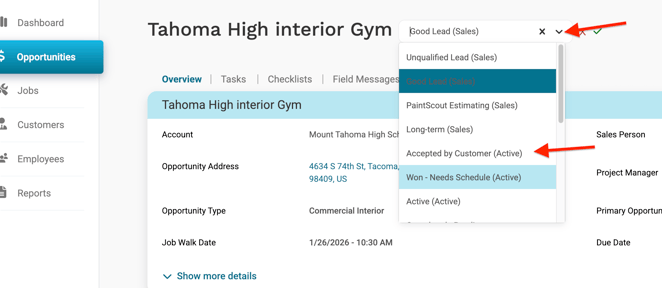
An Opportunity is a sales lead that has not yet been converted to a Job. Opportunities are where you schedule Job Walks, build estimates, and push leads to PaintScout. When an Opportunity is won, and the stage is changed to Active, it becomes a Job.
The Opportunities list
The Opportunities list shows all sales Opportunities in your account. Use it to view, search, and filter your list. Search by name using the search bar on the right-hand side next to the filters.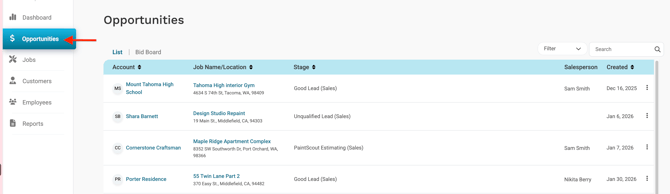
Opportunities are created by a user in the web app or automatically through certain integrations.
List actions
Select the three-dot menu on any Opportunity in the list to:
- View. Open the Opportunity.
- Delete. Permanently remove the Opportunity from Workglue.
Deleting an Opportunity is permanent. Deleted Opportunities cannot be recovered. Jobs cannot be deleted.
The Bid Board
The Bid Board is a weekly or calendar view of your Opportunities. Switch between List and Bid Board using the toggle at the top of the Opportunities page.
The Bid Board shows:
- Job Walk dates. Scheduled site visits for Opportunities, shown in blue.
- Due dates. Deadlines attached to Opportunities, shown in red.
Select Add Job Walk Date or Add Due Date at the top of the Bid Board to schedule dates for an Opportunity.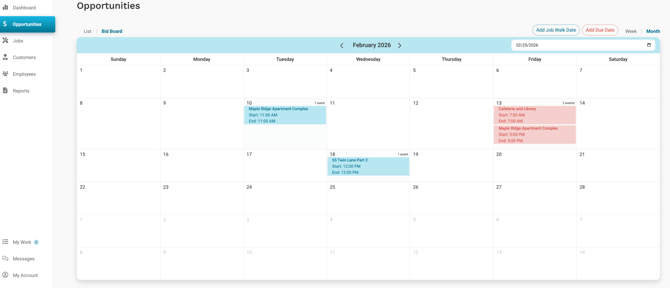
Bid Board appointments can be sent to an external calendar using the Zapier integration.
Creating an Opportunity
Opportunities can be created from three places in Workglue. All three flows use the same steps.
From any page
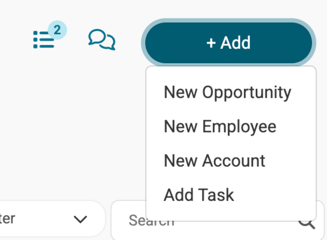
- Select the + Add button in the top right.
- Select New Opportunity.
- Create or select a customer.
- Enter a unique Opportunity name.
- Choose the Job stage.
- Select Create Opportunity.
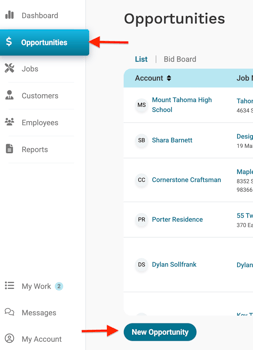
From the Opportunities list
- Go to Opportunities.
- Select New Opportunity at the bottom of the list.
- Create or select a customer.
- Enter a unique Opportunity name.
- Choose the Job stage.
- Select Create Opportunity.
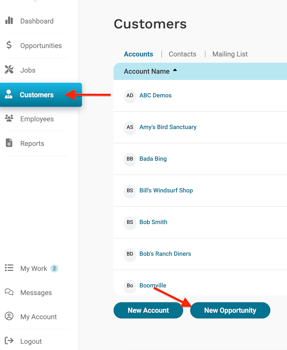
From the Customers list
- Select Customers.
- Select New Opportunity at the bottom of the list.
- Create or select a customer.
- Enter a unique Opportunity name.
- Choose the Job stage.
- Select Create Opportunity.
Opportunity names must be unique.
Converting an Opportunity to a Job
When an Opportunity is ready to move forward, change the stage to an Active stage. This converts the Opportunity into a Job. For details on what happens during that conversion, see Creating Jobs.