
A Customer Account in Workglue represents a client your company does business with. Every Job and Opportunity in Workglue belongs to an Account. The Account holds the Customer's billing information, contacts, lead sources, files, and the full history of Jobs linked to that Customer.
What a Customer Account includes
- Account Name. The name of the customer as it appears throughout Workglue.
- Account Photo. An optional photo or logo for the account.
- QuickBooks Customer ID. Populated when the account is synced to QuickBooks Online. Hover over the QBO badge on the account name to see the ID.
- Website.
- Billing Address, City, State, Country, Zip/Postal Code.
- Tax Exempt and Tax Exempt Reason.
- Customer Type. The type of customer, such as Residential or Commercial.
- Contacts. The people associated with this account. At least one contact is required.
- Lead Sources. Where the lead for this customer originated.
- Account Files. Documents attached to the account.
- Custom Fields. Company-specific fields configured for customer accounts.
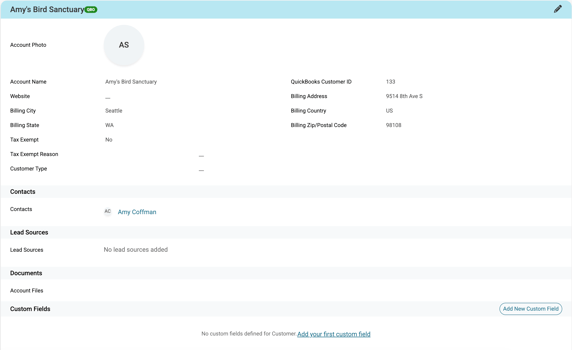
The Account page
The Account page is organized into three tabs:
- Account Details. The full Customer profile including billing information, Contacts, lead sources, files, and custom fields. Select Add New at the bottom to create a new Opportunity for that Account.
- Job History. A list of all Jobs linked to this Account, regardless of stage. Shows Job name, address, PO number, created date, completed date, and current stage. Jobs can be searched by name.
- Invoice. Invoices linked to the account.
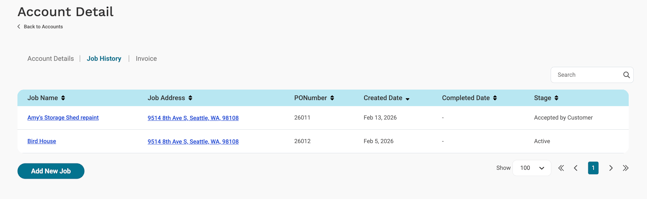
The Job History tab shows all Jobs for the account, regardless of stage, including Sales, Active, and Closed Jobs.
How accounts connect to the rest of Workglue
- Jobs and Opportunities. Every Job and Opportunity belongs to one Account. The Account is selected when creating an Opportunity and carries over to the Job.
- Contacts. Contacts are attached to Accounts and can also be attached directly to Jobs and Opportunities.
- QuickBooks Online. For Accounts using the QuickBooks Online integration, the Customer Account in Workglue is the Customer in QuickBooks Online.
Hover over the QBO badge on the account name to see the QuickBooks Customer ID. This is useful when troubleshooting sync issues.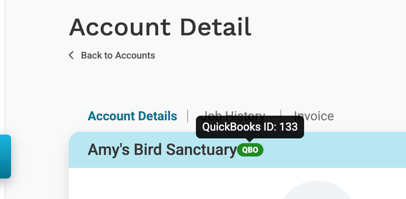
Account names
Customer Account names must be unique across your Workglue account.