
Job Stages
Workglue has 14 pre-defined Job Stages for Opportunities and Jobs, separating sales Opportunities from active work. You can rearrange and rename the stages, but the functionality stays the same. Additional stages may be added.
Job Stages are used to trigger automations in Workglue and Zapier.
Job Types
Workglue provides a couple of default Job types, which may be renamed and additional types added depending on your company's operations.
Customer Types
Add and modify the types of customers in your company.
If you are using the QuickBooks Online integration, you will be able to sync your Workglue Customer Types with your QuickBooks Customer Types using the button.
Any changes made to the QuickBooks Online Customer Types must be made in QuickBooks and then manually synced over in Workglue.
Lead Sources
Use Lead Sources to track where your sales leads come from.
Cost Codes
Cost Codes are used to track Service and Materials in Workglue.
When using the QuickBooks Online integration, these are your Products & Services.
Select whether it is a Service or a Material. Enter a name, default cost, price, and description. Select if the item is Taxable or hidden from the mobile or web app.
File Categories
Use File Categories to organize your documents by type and purpose. Label a category as 'Restricted' to limit access to specific users.
The permission settings for a user to see Restricted Documents are on the Employee Detail page.
Email Templates
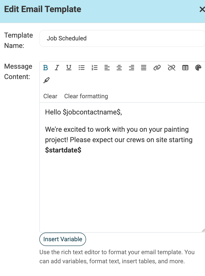
Create and edit email templates for your organization. Use the text editor to format your emails and variables, personalizing them with opportunity- or job-specific information.
Custom Fields
Add Custom Fields to Customer, Contacts, Job, and User/Worker records. The fields will be available wherever the selected entity type is viewable. Use these fields to store additional information specific to your business needs.